Building an Expert System
Unit 6: Knowledge-Based Agents and Inference — Section 6.7
You now have all the theoretical tools: knowledge bases, tell-ask, inference rules, forward and backward chaining, Horn clauses, and the frame problem. This section brings them together into a practical skill — knowledge engineering: the art and discipline of building an expert system for a real domain.
An expert system is a knowledge-based agent designed to replicate the decision-making ability of a human specialist in a specific domain. The challenge is not the inference engine (which is domain-independent) but the knowledge base — extracting, structuring, and validating the rules that capture genuine expertise.
What Is an Expert System?
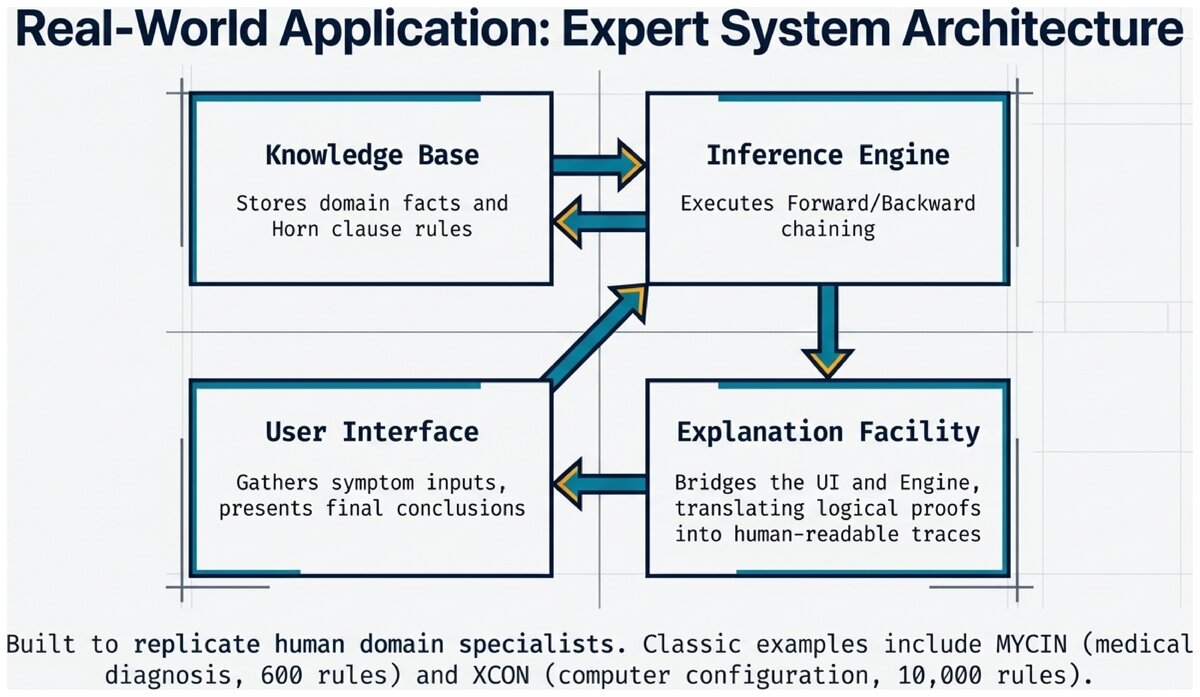
An expert system has four main components:
- Expert System
-
A knowledge-based AI system that encodes the expertise of human specialists in a specific domain as logical rules, and uses an inference engine to provide advice, diagnoses, or recommendations. Classic examples include MYCIN (medical diagnosis), XCON (computer configuration), and Dendral (chemical structure analysis).
| Component | Role | Example |
|---|---|---|
Knowledge Base |
Stores facts and rules in the domain |
Medical symptoms, disease rules, drug interactions |
Inference Engine |
Applies rules to derive conclusions |
Forward chaining: fires rules whose conditions are met |
Explanation Facility |
Shows the reasoning chain to users |
"Flu was diagnosed because fever ∧ cough → respiratory_issue → … → flu" |
User Interface |
Gathers inputs and presents conclusions |
Web form for symptom entry; diagnosis output panel |
- Knowledge Engineering
-
The process of building a knowledge base by eliciting expertise from human specialists and encoding it as logical rules. A knowledge engineer is the person who bridges the gap between the domain expert and the formal system.
The Knowledge Engineering Process
Building an expert system is an iterative five-phase process. Unlike machine learning (where you gather data and train), knowledge engineering requires direct collaboration with human experts.
Five Phases of Knowledge Engineering
-
Identify the problem — Define the decision task: what inputs will the system accept? What outputs must it produce? What level of accuracy is required? Who are the users?
-
Find the experts — Identify domain specialists with a proven track record in solving the target problem. Multiple experts provide redundancy and help catch errors in any single expert’s reasoning.
-
Extract the knowledge — Conduct structured interviews, observe experts solving real cases, and ask "what if" scenarios. Document heuristics, rules of thumb, and exceptions. This phase is the hardest and most time-consuming.
-
Encode the knowledge — Translate expertise into logical if-then rules. Organize rules into coherent modules. Handle uncertainty with confidence factors. Use clear, descriptive predicate names.
-
Test and refine — Validate the KB on known cases ("gold standard" cases where the correct answer is known). Compare KB conclusions to expert judgments. Identify missing rules, conflicting rules, and edge cases. Iterate until performance meets requirements.
Conducting Expert Interviews
The expert interview is the core of knowledge acquisition. Experts often cannot describe their own reasoning in explicit rule form — they just "know" the answer from pattern recognition. The knowledge engineer’s job is to draw out that implicit knowledge.
Effective interview questions:
-
"Walk me through a typical case from start to finish."
-
"What is the first thing you check?"
-
"What would make you suspect diagnosis X rather than Y?"
-
"Can you think of an exception to that rule?"
-
"How confident are you in that conclusion?"
-
"What information would change your mind?"
Questions to avoid:
-
"Can you list all your rules?" (Experts do not think in explicit rules.)
-
"How do you do your job?" (Too vague to extract actionable knowledge.)
-
Leading questions that suggest the answer you expect.
Complete Example: Computer Troubleshooting KB
Let us trace through all five phases for a concrete domain.
Phase 1 — Problem Identification
Problem:   Computer won't start or boots improperly
Inputs:    Observable symptoms (lights, sounds, display)
Outputs:   Likely cause and recommended fix
Accuracy:  80%+ on common startup failures
Users:     Non-technical users without diagnostic training
Phase 2-3 — Expert Interview Transcript (condensed)
KE:     "What's the first thing you check?"
Expert: "Whether any lights come on at all. No lights → almost certainly a power supply issue."

KE:     "What if lights come on but nothing else?"
Expert: "I listen for beeps. No beeps usually means RAM. Different beep codes mean different things."

KE:     "What if it beeps normally but nothing shows?"
Expert: "Check the monitor cable first -- that's the easiest fix. Then the monitor. Then the GPU."
Phase 4 — Encoded Knowledge Base
Facts (symptom inputs):
power_button_pressed = TRUE
lights_on = ?
beeps_heard = ?
display_working = ?
fan_spinning = ?
Rules:
R1:  power_button_pressed ∧ ¬lights_on → power_supply_dead
R2:  power_supply_dead → check_power_cable
R3:  power_supply_dead → check_wall_outlet
R4:  power_supply_dead → replace_power_supply
R5:  lights_on ∧ ¬beeps_heard → ram_issue
R6:  ram_issue → reseat_ram
R7:  ram_issue → test_ram_slots
R8:  lights_on ∧ beeps_heard ∧ ¬display_working → video_issue
R9:  video_issue → check_monitor_cable
R10: video_issue → test_different_monitor
R11: video_issue → reseat_graphics_card
R12: ¬fan_spinning ∧ lights_on → motherboard_issue
Phase 5 — Validation
| Test | Symptoms | KB Diagnosis | Actual Cause | Match? | |------|----------|--------------|--------------|--------| | 1 | No lights | power_supply_dead | Dead PSU | YES ✓ | | 2 | Lights, no beeps | ram_issue | Loose RAM | YES ✓ | | 3 | Beeps, no display | video_issue | Bad cable | YES ✓ | | 4 | Lights, fan stops | motherboard_issue | Bad CPU | YES ✓ |
Validation result: 4/4 correct. KB is ready for initial deployment.
Handling Uncertainty with Confidence Factors
Real diagnoses are rarely certain. A symptom might be associated with multiple possible diseases. Confidence factors (CFs) are a practical way to express degrees of certainty without a full probabilistic framework.
Confidence Factor Rules
R1: fever ∧ cough → flu  (CF: 0.7)
R2: fever ∧ cough ∧ body_aches → flu  (CF: 0.9)
Rule R1 says: if fever and cough are present, the system is 70% confident the diagnosis is flu. Rule R2, with the additional body_aches evidence, raises confidence to 90%.
Combining CFs through rule chains:
flu_likely (CF: 0.7) and flu → rest_recommended (CF: 1.0)
→ rest_recommended has CF = 0.7 × 1.0 = 0.70
MYCIN pioneered this approach and used a more sophisticated combination formula. Note that CFs are a heuristic approximation — a full probabilistic treatment uses Bayesian networks (covered in Unit 7).
Explanation Facilities: Why Transparency Matters
One of the defining features of expert systems is that they can explain their reasoning. A good explanation facility shows the inference chain from initial facts to final conclusion.
Sample Explanation Output
=== Explanation for: recommend_rest ===

Step 1: Given facts: fever=True, cough=True
Step 2: Fired R1: fever ∧ cough → respiratory_issue
Step 3: Inferred: respiratory_issue=True
Step 4: Fired R2: respiratory_issue ∧ fatigue → possible_flu
Step 5: Inferred: possible_flu=True
Step 6: Fired R3: possible_flu ∧ body_aches → flu
Step 7: Inferred: flu=True
Step 8: Fired R4: flu → recommend_rest
Step 9: Concluded: recommend_rest=True
This trace lets a doctor (or auditor) verify every reasoning step. It is very different from a neural network that outputs a recommendation with no justification.
Best Practices for KB Design
Do this:
-
Use clear, descriptive predicate names (
respiratory_issue, notRIorx1) -
Group related rules into named modules (flu rules, cold rules, allergy rules)
-
Keep rules simple: one conclusion per rule, minimal conditions
-
Add comments explaining the source of each rule
-
Handle uncertainty explicitly with CFs rather than ignoring it
-
Test incrementally: validate each module before building the next
-
Document the expert source for each rule
Avoid this:
-
Overly complex rules (break long antecedents into intermediate steps)
-
Redundant rules that derive the same conclusion two ways (unless intentional)
-
Hardcoded thresholds (use variables:
temperature > threshold) -
Rules without sources (impossible to audit or update later)
-
Skipping the validation phase (the KB will fail on real cases)
Common Pitfalls and Solutions
Pitfall 1: Rule Conflicts
R1: temp > 100 → fever_high
R2: temp > 99  → fever_low
Problem: Both fire when temp = 101.
Solution: Make ranges mutually exclusive.
R1: temp > 100              → fever_high
R2: temp > 99 ∧ temp ≤ 100 → fever_low
Pitfall 2: Missing Edge Cases
The KB works on cases from the interview but fails when a patient has an unusual combination of symptoms the expert forgot to mention.
Solution: Test boundary conditions, run adversarial cases, have multiple experts review.
Pitfall 3: Overfitting to Training Cases
The KB was built from specific cases and reasons about those cases perfectly, but fails on new cases.
Solution: Extract underlying reasoning principles, not just decisions from specific cases. Keep rules general; avoid encoding case-specific details.
The CLIPS expert system shell (C Language Integrated Production System) is open-source and public domain. It implements a forward-chaining production system with a Rete algorithm for efficient rule matching. You can experiment with CLIPS at clipsrules.net.
The aima-python library (MIT license) includes logic and knowledge base modules that implement propositional KB, forward chaining, and backward chaining in Python. Source: github.com/aimacode/aima-python
Think about a field of expertise you know well — a sport, a trade, a medical condition you’ve researched, or a complex system you’ve worked with.
Sketch a five-rule knowledge base for a domain-specific decision: What symptoms or conditions would you check? What conclusions would follow? What edge cases would your rules miss?
Now think about how you would validate your KB. What "gold standard" cases would you use? How many cases would be enough to trust the system with real decisions?
Apply your knowledge of knowledge engineering to a scenario.
Based on the UC Berkeley CS 188 Online Textbook by Nikhil Sharma, Josh Hug, Jacky Liang, and Henry Zhu, licensed under CC BY-SA 4.0.
Code examples adapted from aima-python, MIT License, Copyright 2016 aima-python contributors.
This work is licensed under CC BY-SA 4.0.